Change Password
Overview
Lets an agent update their account password from within the app.
Navigate to: Home → More → Change Password
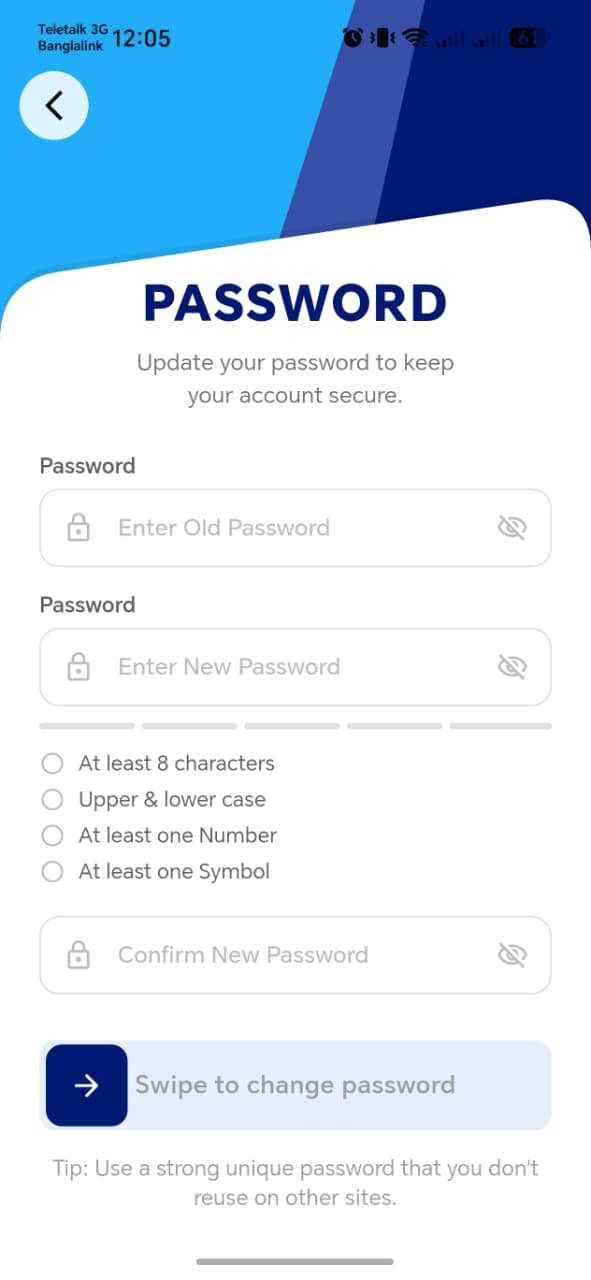
Per the functional spec, this requires old password + new password — the same shape as the Owner App's Change Password screen (see Rate Payer App manual — Profile & Settings → Change Password) screen.
| Field | Required | Notes |
|---|---|---|
| Current (old) password | Yes | Likely with a show/hide toggle, consistent with the rest of the app |
| New password | Yes | Likely enforces the same 4-rule strength requirements seen elsewhere (at least 8 characters, upper & lower case, at least one number, at least one symbol) — confirm once the screenshot is in |
| Confirm new password | Yes | Must match New password |
Things to check
- An incorrect Current password is rejected with a clear error, not a generic failure
- New password is validated against all strength rules before the update button is enabled
- After a successful change, confirm whether the agent is signed out (forcing re-login with the new password) or stays signed in — and either way, the old password should no longer work
- Confirm this only affects the agent's own login, not any rate payer accounts the agent may have created via Add Rate Payer